How can I automatically play a movie in Windows Media Player?
The simplest option is to autorun the video file itself and let it open in the user's default player. See How do I autorun a video (MP4)? Use Windows Media Player when you specifically want it, for example to start in full screen.
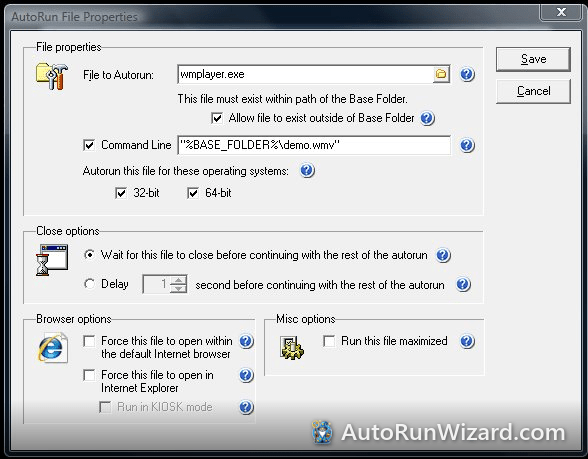
Windows Media Player is already on the user's PC (on Windows 11 it is called "Windows Media Player Legacy"), so AutoRun Wizard launches it from there and passes your movie on the command line:
- File to Autorun:
C:\Program Files\Windows Media Player\wmplayer.exe - Check Allow file to exist outside of Base Folder, because the player is not on your disc.
- Check Command Line and enter your movie with the %BASE_FOLDER% macro, which becomes the root of your disc on the user's PC. Put quotes around it so file names with spaces work:
"%BASE_FOLDER%movie.mp4" /fullscreen
Leave out/fullscreento play in a window. - Save, then Test.
Good to know
- Use MP4 (H.264 video, AAC audio). WMV also plays in Windows Media Player.
- Windows Media Player is not included in the "N" editions of Windows. If your audience is wide, the plain MP4 autorun is safer.
- More switches are listed in Windows Media Player command line options.
Try it yourself. AutoRun Wizard is free to download and fully functional - see how it handles this on your own USB drive or CD.
Download & Try Free